
Try Engage on your own inbox
Connect your stores, bring your real customer messages in and see how much of your inbox Engage clears before you commit.

Engage AI answers routine buyer messages on its own, from tracking to invoices, while auto-responders cover weekends and busy periods. Your team only sees what needs a person, with the order, stock and profit already open.
The messages that eat your team's day are the ones Engage automates first. Here is what changes when they stop landing on someone's desk.
Up to 80% of your support inbox, handled without your team
“Where is my order?” messages bury everything else
Engage AI answers tracking questions on its own, with the courier link from the live order.
AutomatedInvoice requests eat hours every week
Engage AI sends invoice copies itself, and any agent can attach the order invoice as a PDF in one click.
AutomatedWeekend and peak-time messages pile up
Auto-responder rules reply with reply caps and a human-like delay, so buyers hear back while you're away.
AutomatedMessages scattered across every marketplace and brand
Amazon, eBay, Shopify, Walmart, OnBuy and Mirakl land in one inbox, sorted by type with a reply countdown.
One inboxAgents switch between three tools to answer one question
The order, tracking, stock and profit sit beside every conversation, so the answer is on one screen.
One screenRefunds approved without knowing what they cost
See a refund's real impact before you approve it, with partial-refund suggestions that protect margin.
Margin kept with LinnworksUp to 80% depends on your message mix and the request types you switch on. Illustrative animation.
Choose how AI joins your team. Start with suggested replies, then move to live responses when you're confident.
Suggest replies. AI drafts a reply on each supported ticket. Your team reviews and sends.
Tracking links and delivery updates.
AvailableInvoice copies and payment questions.
AvailableReturn steps and refund requests.
Coming soonSpecs, details and compatibility.
Coming soonAccount and everyday questions.
Coming soonA standalone helpdesk only has the message. Engage already has the order, the stock and the margin, so the answer is on one screen.
Customer on eBay: “My jacket arrived damaged. Can you send me another one in blue?”
Agent needs: order, stock and marginRead the message
Check blue stock
Check the margin
Write and send reply
Open the ticket
See stock and profit
Offer blue and send
Resolvedon one screen
Illustrative workflow and timings; your results will vary. Assumes stock and margin data are kept outside eDesk, as is typical with a standalone helpdesk.
Buyer messages from every marketplace and store land in the same place, whether the channel connects directly or through Mirakl, across all your brands.
 +1
+1 +1
+1 +1
+1 +1
+1 +1
+1 TikTok ShopComing soon
 +1
+1 +1
+1 +1
+1From the first message to the weekly review, here is what each part of Engage does.
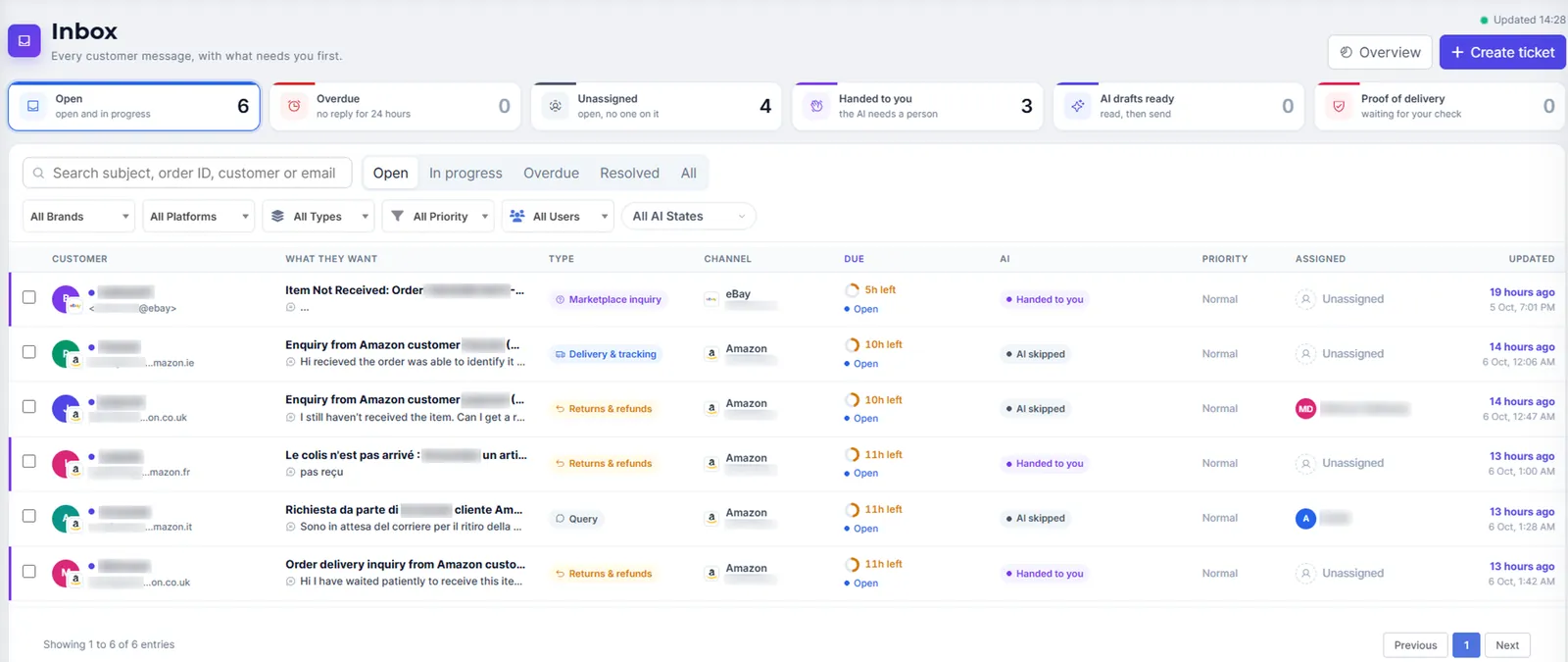
Messages from every marketplace and brand land here together, sorted by type with a countdown showing how long is left to reply.
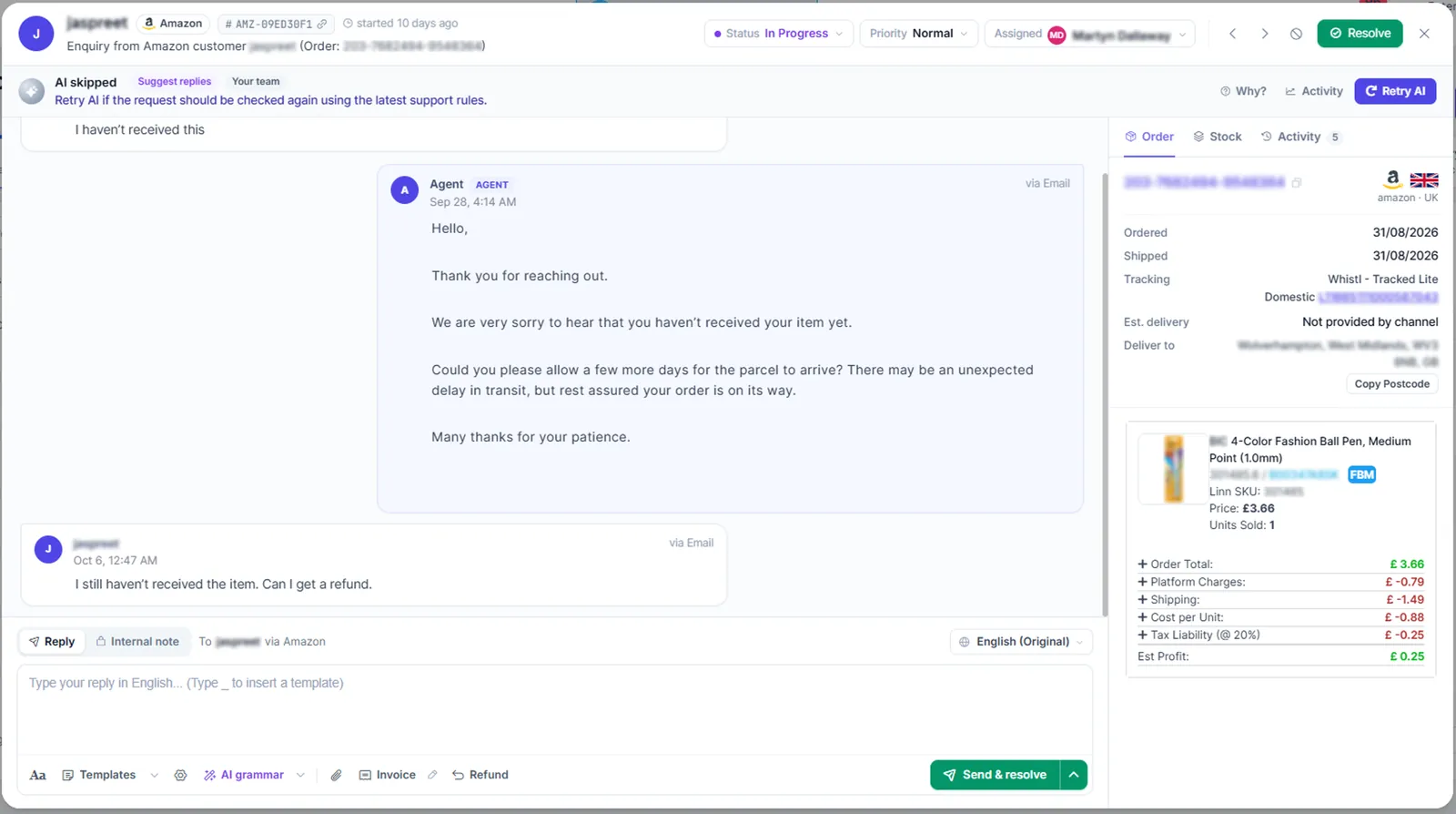
Your agent never has to switch tabs to answer a customer. The order, product and profit sit right next to the reply box.
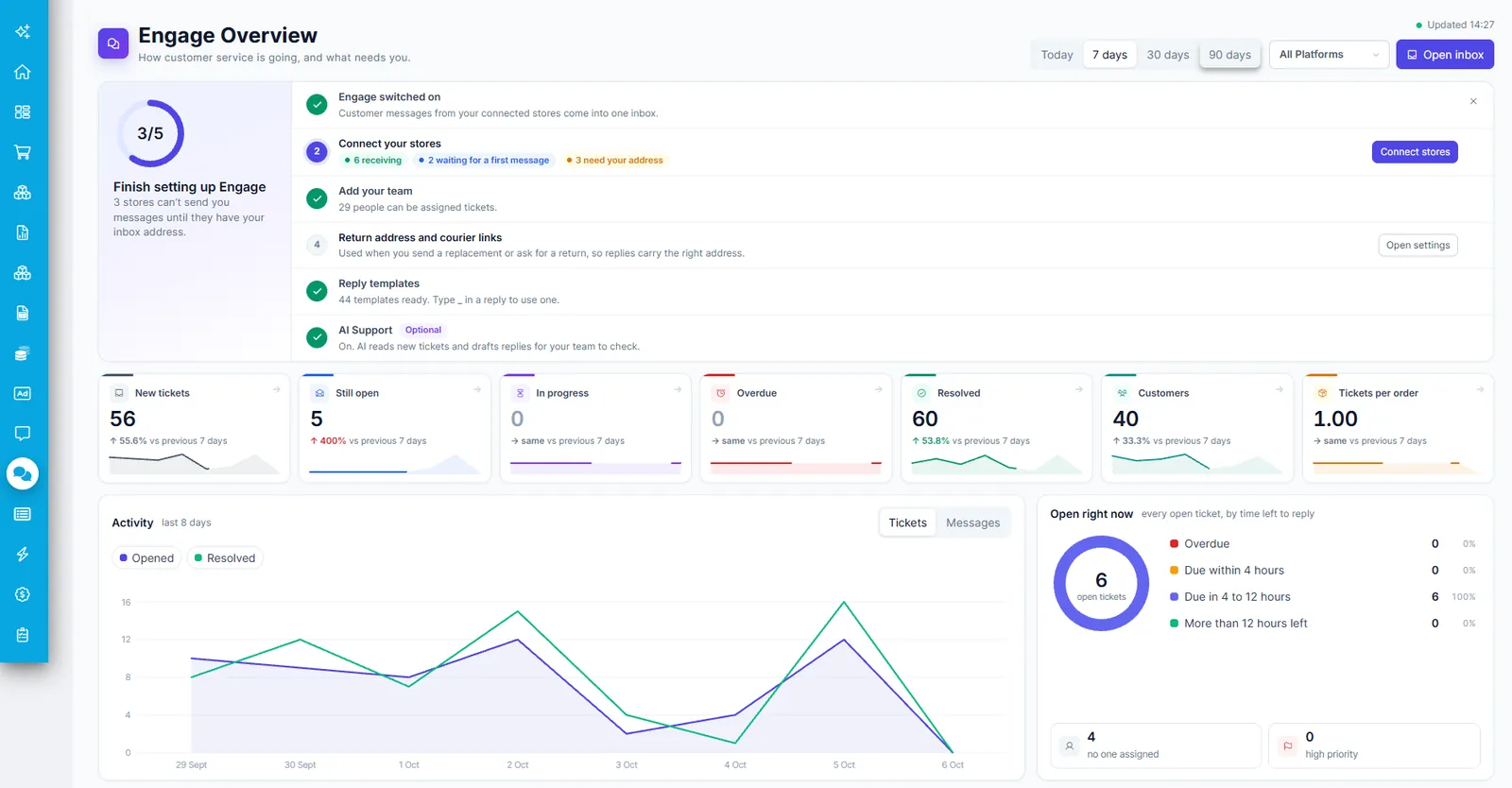
Pick 7 days and all platforms, then check what is still open, what is overdue and what needs a reply right now.
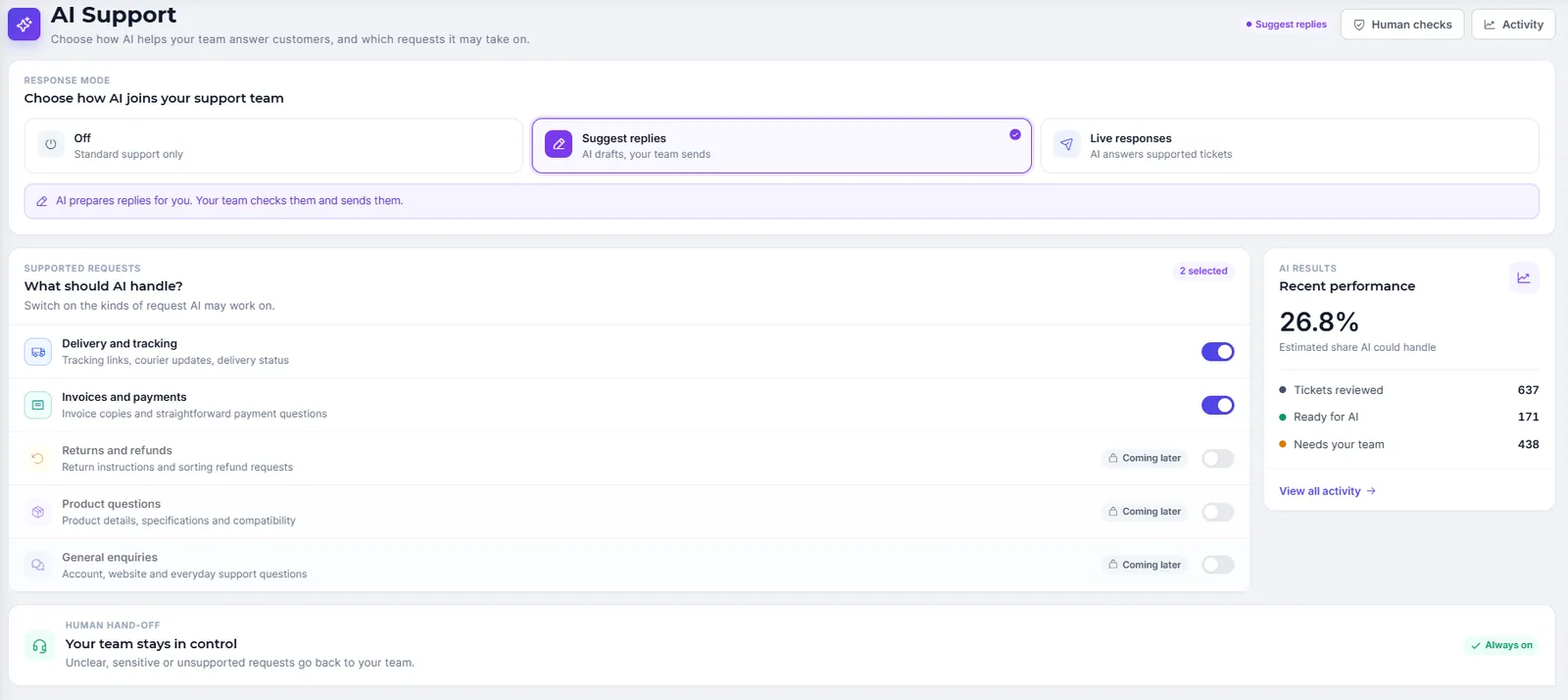
Switch on the request types AI can work on and choose whether it suggests replies or sends them.
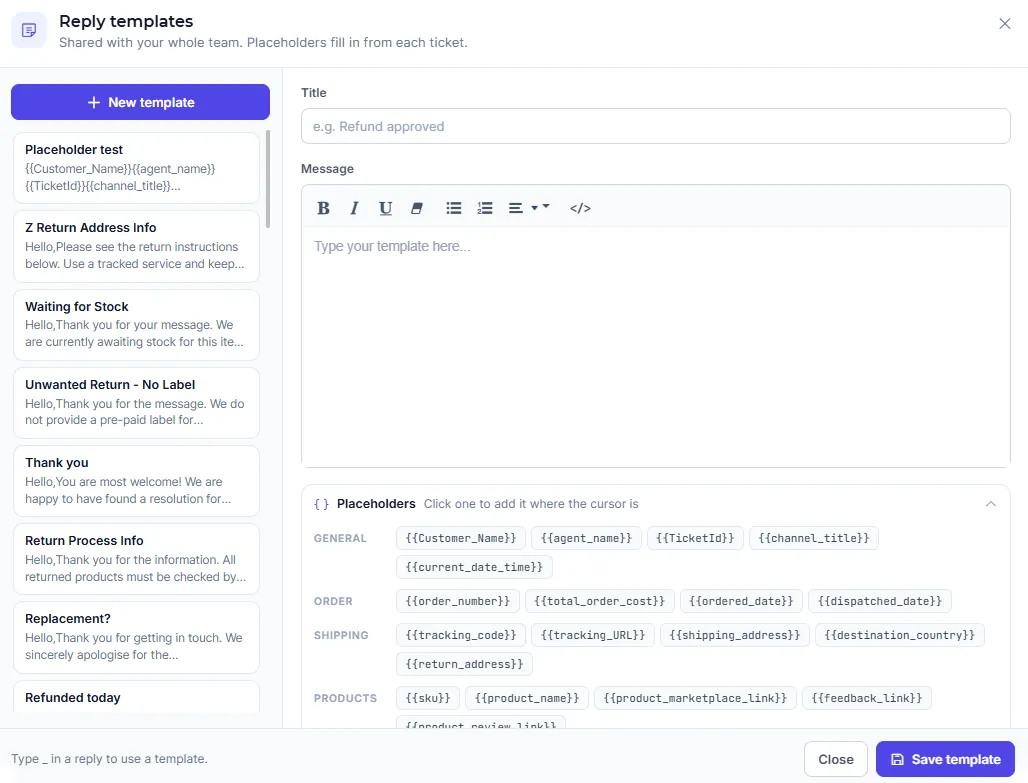
Templates are shared with your whole team. Type an underscore in any reply box to insert one.
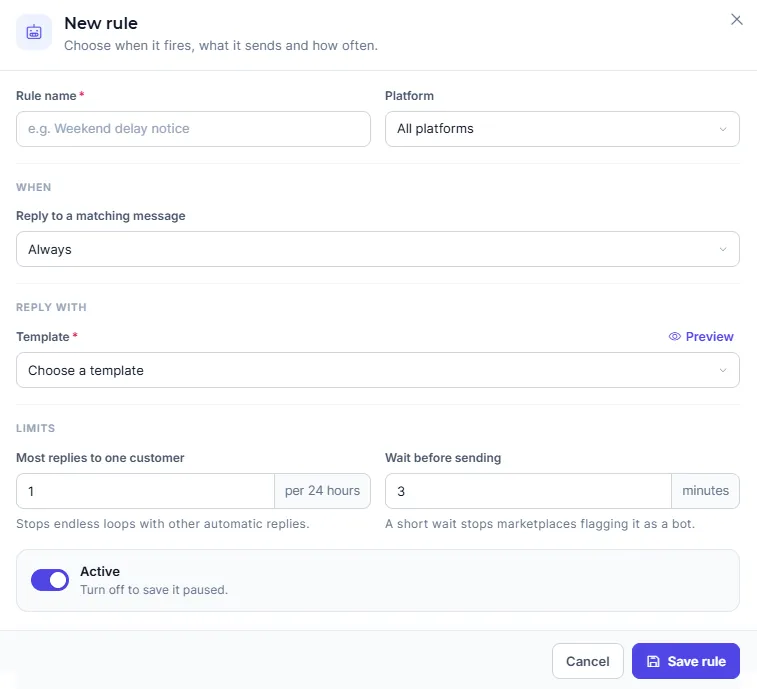
Cover weekends and busy periods without risking bot loops or marketplace flags.
Built into every Engage ticket, so the work that is left takes minutes, not hours.
×Engage works on its own. With Linnworks connected, agents check stock, offer alternatives and send replacements without leaving the ticket.
eDesk and Replyco are general helpdesks. Engage is the only one with profit and stock in every ticket, plus AI agents that resolve tickets.
| Feature | Engage | eDesk | Replyco |
|---|---|---|---|
| Unified ticket inbox | |||
| Amazon, eBay, Shopify and B&Q | |||
| Estimated profit in every ticket | |||
| Stock availability per locationwith Linnworks | |||
| Parent and alternative SKU visibilitywith Linnworks | |||
| Refund approval from support to finance | Partial | ||
| Auto-export refunds to Excel | |||
| Smart delay that mimics a human | |||
| AI agents that resolve tickets | Partial | ||
| Built into a profitability dashboard |
eDesk and Replyco details are based on publicly available information (October 2026) and can vary by plan.
Some channels are picked up automatically. Most need one quick step, and Engage Setup shows exactly what each store needs.
 WhatSales channels
Picked up from WhatSales with no extra work.
Shows as Active & Monitored


Add your Engage email in the marketplace’s settings.
Notifications › Messaging
 Other channels
Forward your support email, or connect via SMTP.
support@ → your Engage address

Sign in to eBay, or paste your B&Q API key.
eBay › Agree and Continue
Six steps from connected to fully running.
Connect every store until all show Receiving messages.
Return address, courier tracking links and invoice template.
Replies for your most common questions, with placeholders.
Auto-responder rules for weekends and busy periods.
Start in Suggest replies, then move to Live responses.
Clear tickets, process refunds and track the dashboard.
Connect your stores, bring your real customer messages in and see how much of your inbox Engage clears before you commit.
Step-by-step guides for every part of Engage, and a team that replies.
Can't find what you're looking for? Email support@whatsales.com and we'll help.
Automate up to 80% of your support inbox across every marketplace, brand and store, and give your team only the messages that need them.
Already a customer? Log in at app.whatsales.io
We value your privacy
We use cookies to enhance your browsing experience, serve personalised ads or content, and analyse our traffic. By clicking “Accept All”, you consent to our use of cookies.