
How To Connect
How to Connect Your B&Q Marketplace Store to Engage
Time-Saver Benefit
Manage B&Q marketplace inquiries in one central place. Integrating B&Q using your seller API key routes all buyer messages directly into Engage, allowing your support team to respond faster and meet response targets.
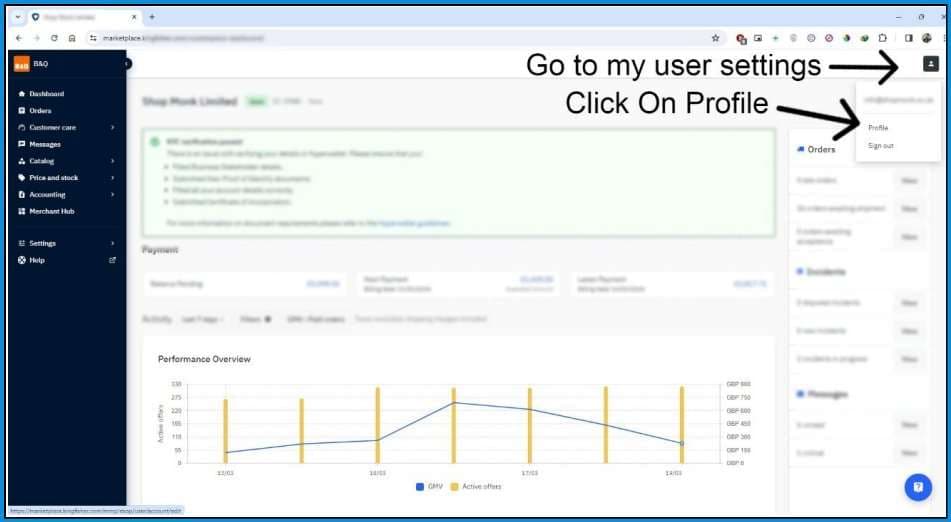
Step 1: Go to User Settings & Open Profile
Log in to your B&Q Marketplace seller portal.Click on the User Icon in the top-right corner of the dashboard, and select Profile from the dropdown menu.
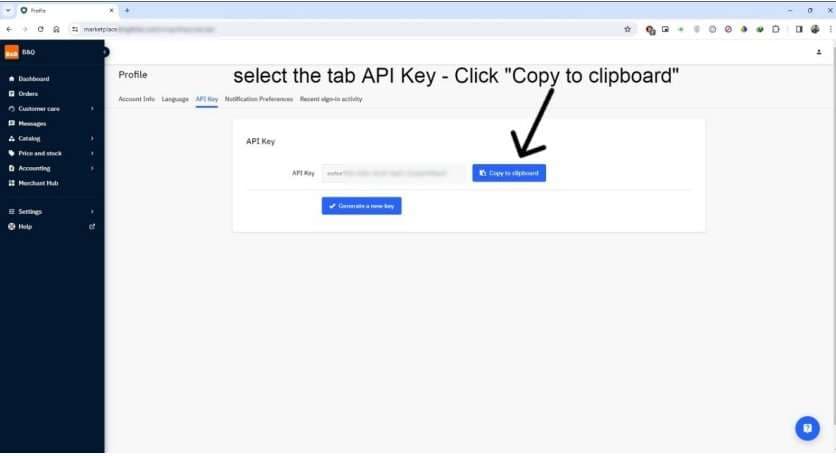
Step 2: Copy Your API Key
Inside your Profile page, click on the API Key tab.Click the Copy to clipboard button to copy the API key.Paste this key into the B&Q settings field inside Engage to activate the integration and finalise the connection.
Note: Your API key is highly sensitive. Never share it publicly or display it in unsecure locations.
You're all set! Once the API key is entered, your B&Q messages will sync automatically and appear in your Engage tickets inbox.