Connect Your Platforms
Multiple Stores for the Same E-Commerce Platform in WhatSales
If you're managing more than one store on the same e-commerce platform (e.g., multiple Shopify, Amazon, or eBay accounts), each store must be added under a separate brand in WhatSales. This structure helps keep your data organised and ensures proper syncing.
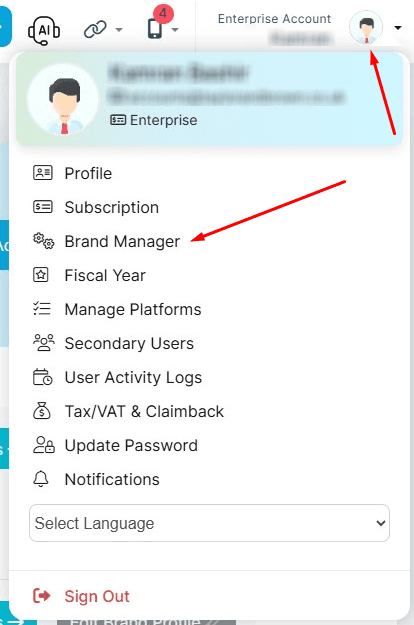
Steps to Add a Second Store:
- Click on your profile icon (top-right corner).
- Select Brand Manager from the dropdown.
- Click Add a New Brand.
- Complete the setup and connect the second store to this new brand.
Note: This process applies to all supported e-commerce platforms. You cannot add two stores from the same platform under one brand.
Refer to the screenshots for visual guidance.