
Shipping
Import Missing Shipping Costs in Whatsales (Non-Linnworks Users)
When to Use This
Use this method if you are not using Linnworks.
Overview
You can upload shipping costs in bulk for orders with missing charges. This ensures accurate profit and reporting.
Step 1: Go to Orders
Open:https://app.whatsales.io/Orders
Click Show More → Import Shipping Costs

Step 2: Download Missing Orders File
Click Missing Shipping Orders → DownloadThis file includes all orders without shipping charges.
Step 3: Update the File
Only fill the required columns:
- Column C = Courier Name of the order
- Column D = Shipping cost (must be in your store currency)
Important:
- Do not edit, delete, or change any other columns
- Both fields are mandatory
Step 4: Upload the File
Click Show More → Import Shipping Costs
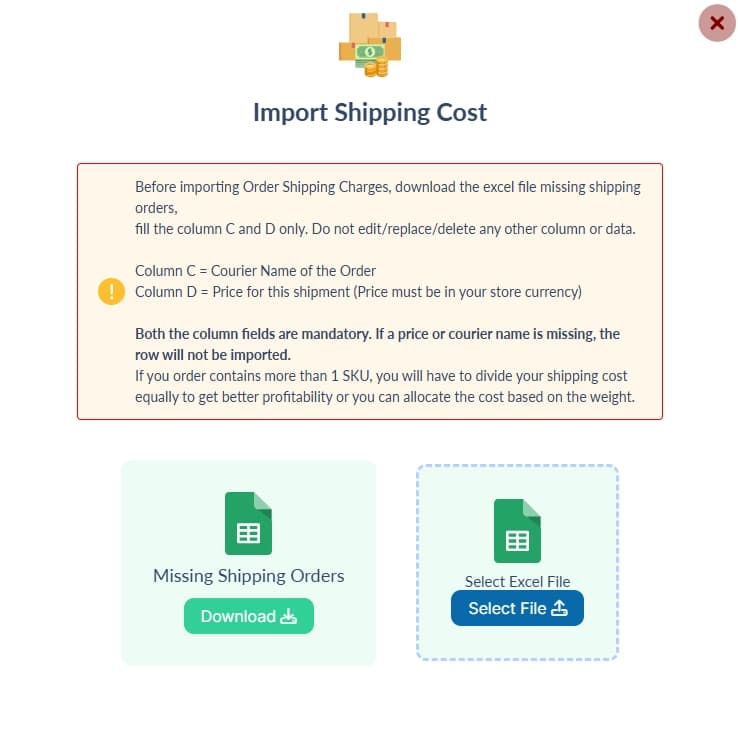
- Click Select File
- Upload your updated Excel file
Step 5: Complete Import
Submit the file.Shipping costs will be applied to the respective orders.
Best Practices
- Use the downloaded file only
- Fill all required rows
- Keep currency consistent with your store
- Double-check courier names
- Test with a small batch first
Common Mistakes to Avoid
- Editing column structure
- Leaving Column C or D empty
- Entering text instead of numbers in cost
- Using wrong currency
- Uploading a different or modified file
Important Note
If an order has multiple SKUs:
- Divide shipping cost equally
- Or allocate based on weight for better accuracy
Recommendation
Update shipping costs regularly.Accurate shipping data improves profit tracking and reporting.