
Product Performance
Pricing Health Feature Overview
The Pricing Health feature in WhatSales helps sellers evaluate profitability across multiple platforms such as Amazon and eBay. It identifies products with incorrect pricing by calculating estimated profit margins based on selling price, platform fees, fulfilment costs, and total expenses.
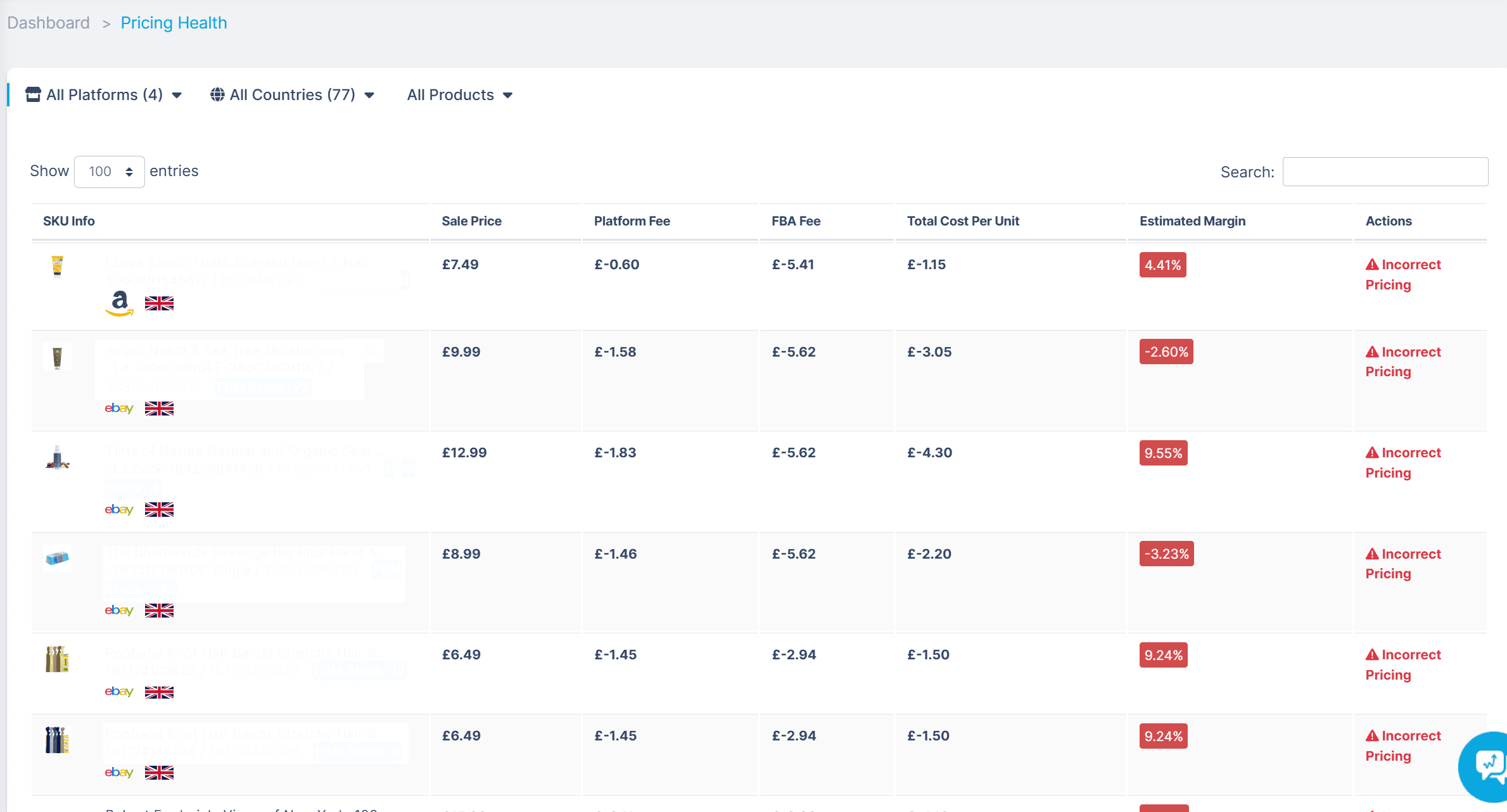
Accessing the Pricing Health Dashboard
To access the Pricing Health dashboard:
- Navigate to the Dashboard in your WhatSales account.
- Click Pricing Health in the left-side menu.
- Use the filters at the top to refine your view by:Platform (Amazon, eBay, Shopify, etc.)
- Country
- Products
- Search bar (top-right) to locate specific SKUs
Understanding the Pricing Table
The Pricing Health dashboard displays detailed insights for each SKU’s pricing and margin.
Column Descriptions:
- SKU Info: Includes product image, SKU name, platform (Amazon/eBay), and stock status (FBA/FBM).
- Sale Price: The current selling price of the SKU.
- Platform Fee: The commission charged by the respective platform.
- Fulfilment Fee: Costs related to order fulfilment (e.g., FBA or third-party fulfilment).
- Total Cost Per Unit: The full cost per item, including manufacturing, shipping, and operational expenses.
- Estimated Margin: The profit margin percentage after deducting all costs.
- Actions: Displays an “Incorrect Pricing” warning when the margin falls below the configured threshold.
Interpreting the Data
- Green Margin (%): Indicates a profitable SKU that meets the set profit margin target.
- Red Margin (%): Indicates incorrect pricing due to a low or negative margin.
Example:
- SKU with a 4.41% margin is marked as Incorrect Pricing.
- SKU with a -2.60% margin is being sold at a loss.
- SKU with a 9.24% margin is below the 10% threshold and flagged as Incorrect Pricing.
Correcting Incorrect Pricing
When a product is flagged as “Incorrect Pricing,” take these actions:
- Increase the sale price: Adjust the price to improve profit margins.
- Reduce fulfilment or platform fees: Consider switching from FBA to FBM or alternative fulfilment methods.
- Optimise sourcing costs: Negotiate better rates with suppliers to lower unit costs.
- Review pricing strategy: Analyse competitor pricing to stay competitive while maintaining profitability.
Additional Features
- Stock Levels: Displays FBA and FBM stock counts beside each SKU.
- Sorting & Filtering: Allows filtering by platform, country, or SKU for focused analysis.
- Export Data: Enables export of pricing data for deeper analysis.
Summary
The Pricing Health feature in WhatSales is an essential tool for maintaining profitable pricing across platforms. It helps sellers identify low-margin SKUs, prevent financial losses, and make informed pricing decisions.
Key Takeaways:
- Monitor pricing regularly to ensure consistent profitability.
- Take prompt action on incorrect pricing alerts.
- Use filtering options to focus on critical SKUs.
Optimise your pricing strategy with WhatSales to enhance profitability across Amazon, eBay, and other sales channels.